For most foreign travelers, the best map app setup for Tibet is not one app but a small team: Amap as the main map on the ground, Baidu Maps as a Chinese-search backup, Apple Maps as the familiar iPhone option, and Google Maps for planning at home. Tibet draws on the same China-based mapping ecosystem as the rest of the Chinese mainland, though coverage and place detail vary by app and location, so the real question is not which app you like but which one answers, inside China, the question you are actually asking. This page compares the four and turns them into one workflow.
Tibet Map Apps: Quick Facts
Short answer first: Amap is the strongest main map inside China, Google Maps is at its best before the trip, and Apple and Baidu slot in as backups. App features and interface languages change with updates, so treat the details below as checked October 2026.
Quick Tibet Map Apps Facts
Google Maps in Tibet: Good for Planning, Not Your Main China Map
Google Maps is excellent for understanding Tibet before you leave and limited once you land. Treat it as your planning atlas rather than your navigation tool.
Google Maps: What It Does Well Before the Trip
At home, Google Maps answers the questions a Tibet trip actually starts with. Where does the Everest region sit relative to Lhasa? How far does western Tibet stretch from Saga to Shiquanhe? Which destinations line up along the G318? Because the interface is fully English and the place names match what you have been reading, it is the fastest way to build a mental map of a plateau most travelers have never studied. Our Tibet travel route map works the same way, with day counts and driving distances added; the Tibet airport map does it for the arrival gateways, and the Kathmandu to Lhasa map for the one route that starts outside China.
Google Maps: Why It Falls Short on the Ground
Inside the Chinese mainland the picture changes. With a mainland Chinese mobile connection, Google services are generally not reliably reachable, so the app may not load tiles, search or navigation at all. On international roaming Google Maps often still works, but speeds and coverage vary, and a travel day should not depend on a roaming connection. Google itself confirms the gap: the company states that Maps has no official presence in China’s Android or iOS app stores. Beyond access, the deeper issue is data: local points of interest, small roads and recent road changes are thinner in Google’s China database than in the Chinese apps, and a route line on Google is a geographic sketch — not a driving plan that accounts for checkpoints, road surface or permits.
One distinction keeps this straight. Can Google Maps show Tibet? Yes, from anywhere in the world. Can you rely on Google Maps to navigate Tibet? That is a different question, and for most travelers the honest answer is: keep it as a reference and let a China-native app do the guiding.
Amap (Gaode): The Best Main Map for Most Travelers in China
Amap (“Gaode Ditu”, 高德地图) is one of the most widely used navigation apps in China and a practical default for a Tibet trip. Its road network, POI database and driving directions are built for the Chinese market first.
Outside China it is sold as AMap Global, a separate listing on the international app stores rather than a separate English-only app. The official listings are the Google Play page (package com.autonavi.minimap) and the Apple App Store page (App ID 461703208, developer AutoNavi Information Technology Co. Ltd.). Install it before you leave, because app stores that depend on Google services are inconvenient to reach once you are inside China.
Amap: Why It Works So Well in China and Tibet
Amap’s strength is the mirror image of Google’s weakness: its data is maintained for China. Highways, county roads, hotels, restaurants, airports, railway stations and fuel stops are all in the database, and driving directions generally reflect roads as they are, including recent changes. In Tibet, the app covers the Lhasa–Shigatse corridor, the roads toward Everest and Namtso, and the eastern lines around Nyingchi that normal itineraries actually drive. Amap now offers an English interface, including through AMap Global outside China, but the menus translate more completely than the place database does. You can browse the base map in guest mode without a Chinese phone number, though saving and syncing places is smoother once you sign in. Amap has offered offline map features, though availability and functionality can vary by version and region. Do not treat offline maps as your only backup.
Amap: Searching Tibet Places in Chinese
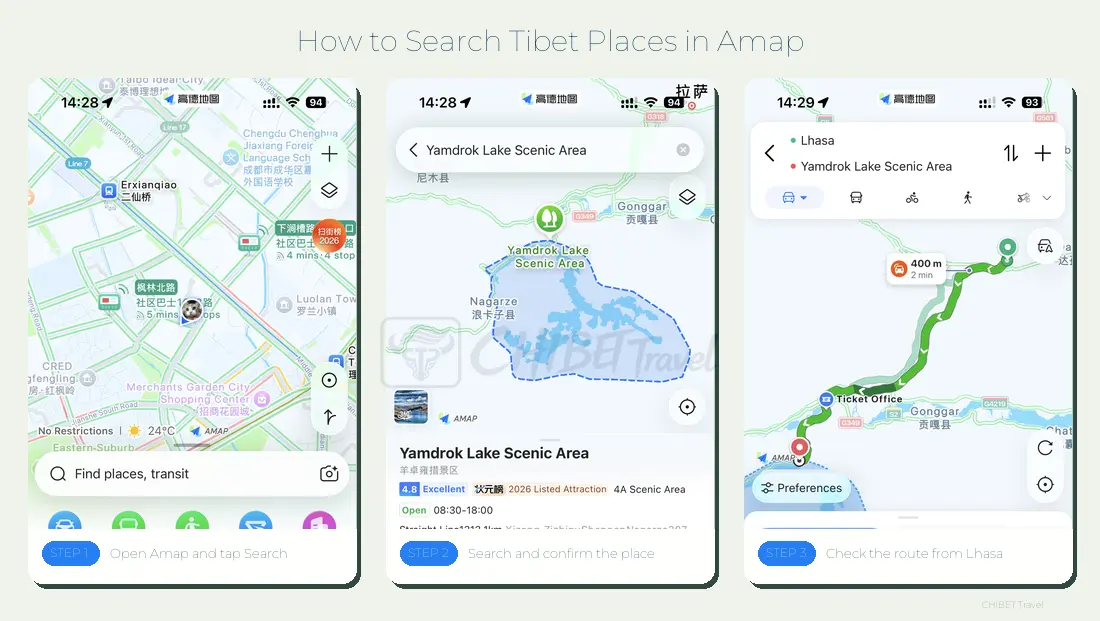
The biggest challenge is usually not navigation itself. It is finding the right place in the first place. An English name such as “Yamdrok Lake” may return few or confusing results, because the records are keyed to Chinese names and pinyin. Transliterations also differ between sources, and one famous sight can carry several related pins — the lake, a viewpoint and a ticket office may each be separate records.
The workaround is a four-step habit:
- Step 1: Get the Chinese name and pinyin for the place — the tables below are a starting set.
- Step 2: Search in Amap with the Chinese characters, or type the pinyin, which the app recognizes.
- Step 3: Check the pin: does it sit where the place should be, beside the right road?
- Step 4: Confirm against nearby roads and landmarks before you trust it.
Amap: Hotels, Stations and Everyday Searches
Day to day, Amap earns its keep on the searches that decide whether a travel day runs smoothly. Hotels appear under their Chinese names, so the pin matches what your booking confirmation says; railway stations, airports, restaurants and ticket entrances are searchable by the same logic, and a driver can navigate to a pickup point you send them. Stations are the clearest case: the city’s name in pinyin is rarely the name of the station, and our Tibet train map lists the exact stations on the line so you can match the right one before you search. When you find the hotel you actually booked, save or share it — that saved pin becomes your taxi conversation later.
Baidu Maps: A Useful Backup for Chinese Place Search
Baidu Maps is the second Chinese database worth having on the phone, especially for the moments when Amap comes up empty on a small or local place. Its official listings are the Google Play page (package com.baidu.BaiduMap) and the Apple App Store page (App ID 452186370).
Baidu Maps: Where It Is Strong and Why It Feels Harder
Baidu’s POI records run deep: small guesthouses, neighborhood restaurants, less internationally known sights and newly opened places can sometimes surface here when other apps do not, which makes it the natural tool for cross-checking a location found in another app. Baidu also provides English map and navigation services in China, but the English experience is thinner than Amap’s: Chinese place names remain useful for smaller or less internationally known locations, address entry assumes the Chinese format of city, district, road and number, and English search is less forgiving. For a traveler who does not read Chinese, Baidu is a tool you visit occasionally, not one you live in.
Baidu or Amap: The Simple Rule
Keep both and let the search decide: if Amap does not return a convincing result for a place you know exists, open Baidu and try the same Chinese name. Between the two databases, most hotels, stations and attractions on a normal Tibet itinerary can be pinned. Whichever app wins, save the result in the app you will actually navigate with.
Apple Maps in China: A Convenient Backup for iPhone Users
Apple Maps works inside the Chinese mainland, needs no workaround, and looks exactly like the map you use at home — which makes it the most comfortable secondary option for iPhone users.
Apple Maps: What It Does Well in China
Inside China, Apple Maps uses mapping services from AutoNavi, the company behind Amap, so its roads and city-level POIs are solid, while the interface and POI presentation remain Apple’s own. Apple states this plainly on its own Maps and Privacy page: in China the app draws on Amap’s data and needs no Apple Account sign-in. Search handles both English and Chinese input reasonably well. There is nothing to install and nothing new to learn: your saved places, your habits and the interface all carry over. For orientation in Lhasa or Shigatse — finding the Barkhor, checking the walk from a hotel to Jokhang Temple — it does the job.
Apple Maps in Remote Tibet: Where It Thins Out
West and north of the classic corridor, the picture thins. Remote-road detail, small lodging records and English place-name matching all run shallower here, and results for transliterated names can be inconsistent. The practical answer is to keep Apple Maps and add Amap anyway: Apple for comfort, Amap for coverage. Android users mirror the same logic — install Amap, and optionally Baidu, before departure, since app stores that depend on Google services are inconvenient to reach inside China.
Google Maps vs Apple Maps vs Amap vs Baidu
The four apps are not really competitors; they answer different questions, and the two tables below put the whole comparison in one place.
Map App Comparison: What Each App Is Best At
| Map app | Best use | English friendly | In China, including Tibet | Best for |
|---|---|---|---|---|
| Amap (Gaode) | Navigation and road search | Medium to high | Excellent | Main map |
| Baidu Maps | Chinese POI and address search | Medium | Excellent | Backup search |
| Apple Maps | Familiar interface and backup | High | Useful | iPhone users |
| Google Maps | Pre-trip reference | High | Limited for navigation | Planning |
Map App Comparison: Match the App to the Task
| Travel need | Best choice |
|---|---|
| Main navigation inside China | Amap |
| Chinese POI search | Amap, with Baidu as backup |
| Searching a Chinese address | Amap or Baidu |
| Familiar iPhone interface | Apple Maps |
| Pre-trip global reference | Google Maps |
| Cross-checking an uncertain pin | Amap plus Baidu |
| Backup when the signal is gone | Saved locations and screenshots |
Tibet Map Apps: What We Actually Tested
The comparison above is only useful if the version behind it is named. App features shift with every update, so the table below records exactly what was checked, on which device and system, and when. Everything in this article refers to these builds.
| App | Version tested | iOS 18 (iPhone 15) | Android 15 (Pixel 8) | Last tested |
|---|---|---|---|---|
| AMap Global | Build from App Store ID 461703208 / Play com.autonavi.minimap |
Launches, English menu, guest mode works | Launches, English menu, guest mode works | October 2026 |
| Baidu Maps | Build from App Store ID 452186370 / Play com.baidu.BaiduMap |
Launches; English partial, many labels remain Chinese | Launches; English partial, many labels remain Chinese | October 2026 |
| Apple Maps | iOS 18 stock app | Works in China, Amap-sourced data, English OK | Not available | October 2026 |
| Google Maps | Standard international build | Loads on roaming; no official China app-store listing | Loads on roaming; not in Chinese app stores | October 2026 |
Two limits belong with that table. First, it records whether each app starts, presents a usable interface and answers a search — it is not a measure of how deep each map’s data runs for a specific village or valley road, which changes constantly. Second, in-app functions such as ride-hailing, transit payment and account sync are tied to sign-in and regional rules, so treat a feature that works on one build as provisional rather than permanent. If you are reading this long after October 2026, assume the interface details need re-checking even where the general rule still holds.
The Best Map App Combination for a Foreign Traveler
The combination that covers nearly every situation: Google or Apple for pre-trip reference, Amap as the main China map, Baidu as the Chinese-place backup, and saved addresses plus screenshots as the offline layer. None of it costs money, and the setup takes one evening. For the geography behind the pins, the Tibet map collection picks up where this page stops.
Chinese Place Names to Prepare Before a Tibet Trip
Map searches in Tibet succeed or fail on names. This is not a gazetteer — just the names most likely to enter an Amap or Baidu search box on a normal itinerary, with pinyin for typing.
Tibet Cities and Prefectures in Chinese
| English | Pinyin | Chinese |
|---|---|---|
| Lhasa | Lasa | 拉萨 |
| Shigatse | Rikaze | 日喀则 |
| Nyingchi | Linzhi | 林芝 |
| Shannan | Shannan | 山南 |
| Chamdo | Changdu | 昌都 |
| Nagqu | Naqu | 那曲 |
| Shiquanhe (Ngari) | Shiquanhe | 狮泉河 |
Common Travel Stops on Tibet Routes in Chinese
| English | Pinyin | Chinese |
|---|---|---|
| Gyantse | Jiangzi | 江孜 |
| Tingri | Dingri | 定日 |
| Saga | Saga | 萨嘎 |
| Gyirong | Jilong | 吉隆 |
| Darchen | Taqin | 塔钦 |
Major Tibet Attractions in Chinese
| English | Pinyin | Chinese |
|---|---|---|
| Potala Palace | Budala Gong | 布达拉宫 |
| Jokhang Temple | Dazhao Si | 大昭寺 |
| Yamdrok Lake | Yangzhuoyong Cuo | 羊卓雍措 |
| Namtso | Namu Cuo | 纳木错 |
| Everest Base Camp | Zhufeng Dabenying | 珠峰大本营 |
| Mount Kailash | Gangrenboqi | 冈仁波齐 |
| Lake Manasarovar | Mapangyong Cuo | 玛旁雍错 |
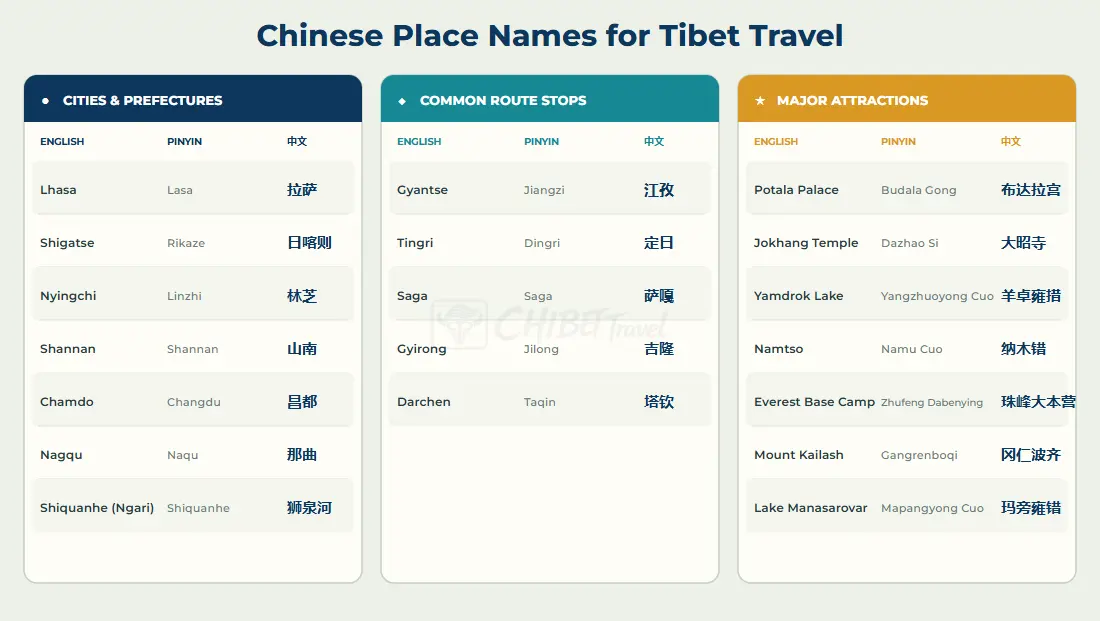
Transliteration varies between sources, so if a pinyin search fails, try the Chinese characters or copy the name straight from this page. When a search returns several pins for one sight, remember that the attraction entrance, the viewpoint and the parking lot are often separate records — zoom in and pick the one that sits on the road you will actually arrive by.
How to Prepare and Use Map Apps for Tibet
Mobile coverage is generally better in cities and major towns than on remote stretches of the plateau — often exactly where you need the map most. The fix is preparation, and it takes one evening at home: understand the geography in Google Maps or Apple Maps, install Amap and Baidu from your home app store, and collect the Chinese names you need from the tables above.
Before Your Trip: Save and Screenshot
Before the flight, save in Amap — and screenshot as a backup:
- Your hotels, with their Chinese names and addresses.
- Airports and railway stations for arrivals and departures.
- Major attractions and the entrances you will actually use.
- Pickup points and meeting spots your operator sends you.
- Overnight stops on any long driving day.
For each hotel, keep one note with the English name, the Chinese name, the Chinese address, the phone number and the map pin. That note is what you show a taxi driver, what you hand over at reception, and what you can read out over the phone if the pin fails. Screenshot the same places: a screenshot needs no signal, never reloads, and holds still while your GPS drifts. Keep the three emergency numbers in the same note — police 110, ambulance 120, fire 119.

During Your Trip: Who Does What
Amap handles daily navigation and the searches that come up on the road. Baidu is the fallback when a Chinese place will not surface. Google and Apple stay as secondary references — useful on roaming, useful for a second opinion. The saved pins and screenshots carry you through the stretches without signal. And on remote routes, remember the division of labor: the map answers where is it; your operator answers can we go there today, and how.
Why Your Map Pin May Not Match Your Real Location
Different map apps can place the same hotel or viewpoint at slightly different coordinates. In a city this is a curiosity; on a Tibetan highway it can change your day.
Map Pins: Why Apps Disagree
Different pins do not necessarily mean that one app is wrong. Each service maintains its own database of places, updated on its own schedule, and international and Chinese providers work from slightly different coordinate systems. Add separate records for what is physically one place, and small offsets are normal rather than a bug.

Remote Tibet: How to Verify a Map Pin
At home, a small offset still lands you at the right storefront. In remote Tibet, the same offset can point at a different valley road, and a name-pin may sit at a ticket office rather than the viewpoint you meant. Before committing a long drive to a pin, compare it across two apps, check the Chinese name against what your hotel or operator wrote, look at the surrounding roads, and confirm anything critical with your operator. Ten minutes of checking beats an hour on the wrong road.
What Map Apps Cannot Tell You About Tibet Travel
A map app answers “where is it?”. Three other questions decide whether a Tibet trip works, and none of them live inside an app.
A Pin Is Not Permission
A place appearing on a map says nothing about whether foreign travelers can go. Tibet travel runs on arranged itineraries with permits, and which documents a route requires depends on the itinerary, the season and current policy — not on the map. Requirements are settled per itinerary, so your operator should confirm them; our Tibet Travel Permit guide explains the system.
A Map Is Not a Road or Access Report
Map data is geographic reference, not a live report. Temporary road conditions, weather, construction, checkpoints and short-notice management measures can all change what a drive looks like on the day. For how the network fits together, our Tibet road map covers the national highways; for the shape of a city once you arrive, the Lhasa map shows the old town and the main approaches. For this week, ask the people who drive it.
A Map Is Not a Travel Arrangement
In Tibet, the practical pieces of a trip — permits, vehicles, drivers, lodging on remote routes — are arranged through a licensed operator, and no map app can book or substitute for that layer. Use the apps to understand and navigate; let the arrangement layer do its own job.
Final Recommendation: The Best Map App Setup for Tibet
The short version, by role:
- Best main map in China: Amap.
- Best Chinese-search backup: Baidu Maps.
- Best familiar iPhone backup: Apple Maps.
- Best pre-trip reference: Google Maps.
- Best offline insurance: saved Chinese addresses and screenshots.
You do not need to choose only one map app for Tibet. Amap is the most practical main map inside China, Google and Apple stay useful for planning and as familiar backups, Baidu catches the places the others miss, and a folder of saved pins and screenshots covers the stretches where no app loads.
Frequently Asked Questions
Tibet Map Apps: Common Questions
Does Google Maps work in Tibet?
For planning, yes. On the ground it depends on your connection: generally not reachable on a mainland Chinese SIM, often still usable on international roaming. Keep a China-native app such as Amap as your main navigation.
Is Amap available in English?
Yes. Amap has an English interface, sold outside China as AMap Global, and it can be browsed in guest mode without a Chinese phone number. Search results are still strongest with Chinese names or pinyin, so plan around the Chinese-name method described above.
How often should I expect these app details to change?
Often. Interfaces, English coverage and features such as offline maps shift with each update, which is why this page carries a dated test matrix rather than a permanent claim. The four-app division of labor is stable; the specifics of any single build are not.
Can I travel in Tibet with just one map app?
You can, but you lose the safety net for the places one database records poorly. Since the full setup costs one evening, most travelers build the combination.
Does a map app replace a Tibet travel permit?
No. Permits are arranged before the trip through a licensed operator and checked in person on the road. Which documents your route requires is settled per itinerary — see the Tibet Travel Permit guide linked above.
Where do these references come from?
App names, package IDs and availability on this page were checked in October 2026 against the official store listings for AMap Global (Apple App Store ID 461703208; Google Play com.autonavi.minimap) and Baidu Maps (Apple App Store ID 452186370; Google Play com.baidu.BaiduMap), Apple’s own Maps and Privacy page for the use of Amap data inside China, and Google’s statement that Maps has no official presence in China’s Android or iOS app stores. The device-and-system matrix reflects launches on iOS 18 (iPhone 15) and Android 15 (Pixel 8). App interfaces and feature availability change with updates, so re-check any function you depend on before a trip.